PMJAY Beneficiary NHA Portal: Ayushman Bharat Pradhan Mantri Jan Arogya Yojana (AB-PMJAY) is the world’s largest government-funded health insurance scheme, offering cashless treatment worth ₹5 lakh per family per year, with no cap on family size or the age of members. The scheme is run by the National Health Authority (NHA), and the official digital gateway to it is the Beneficiary Portal at beneficiary.nha.gov.in. This guide walks through exactly how to register, check your status, download your e-card, and reach the scheme through offline channels if you don’t have reliable internet access — along with how to avoid the fake “Ayushman Card” websites that have sprung up around the scheme’s popularity.
Step-by-Step Guide: How to Login to PMJAY Beneficiary Portal (2026)
If you are a beneficiary looking to access your account, follow these steps precisely. The process has been updated for 2026 to include enhanced security features.
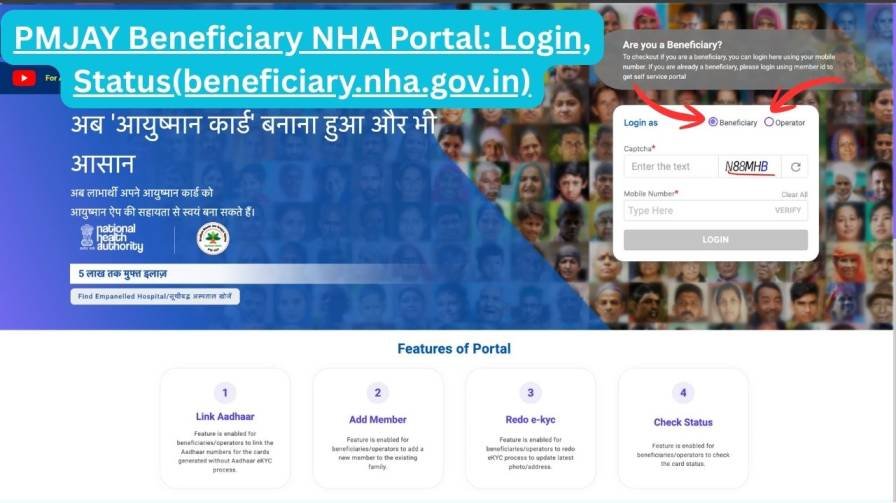
Step 1: Open the Official Website
Launch your web browser and navigate to the only official URL: https://beneficiary.nha.gov.in.
Step 2: Select the “Beneficiary” Login Mode
On the homepage, you will see two options:
- Beneficiary: For citizens and families (self-service).
- Operator: For hospital staff and Arogya Mitras.
Click on “Beneficiary” to proceed.
Step 3: Mobile Number Verification
- Enter your 10-digit registered mobile number.
- Click “Verify” .
- Choose “OTP” as the authentication method.
- Enter the 6-digit OTP received via SMS.
- Click “Verify OTP” .
Note: OTPs expire within 3 minutes. Ensure your mobile is nearby to avoid timeouts.
Step 4: Search Your Family Records
After verification, you will be directed to a search page. Fill in the details:
- Scheme Name: Select PM-JAY (or your specific state scheme).
- State: Your registered state.
- District: Your home district.
- Search By: Choose from Family ID, Aadhaar, Mobile Number, or Ration Card.
- Search Value: Enter the corresponding number or name.
Click “Search” . Your family details will appear. Click on your name to enter the Beneficiary Dashboard.
Step-by-Step: How to Check Your Status or Register as a Beneficiary
- Go to the official site. Open your browser and navigate to beneficiary.nha.gov.in.
- Choose “Beneficiary.” The homepage offers two paths — Beneficiary, for citizens checking their own status, and Operator, for hospital staff or CSC agents assisting others. Select Beneficiary.
- Verify your mobile number. Enter your 10-digit mobile number, choose OTP as the verification method, and enter the 6-digit code sent to your phone. OTPs typically expire within a few minutes, so keep your phone nearby.
- Search your family’s records. On the search page, select the scheme (PM-JAY or your relevant state scheme), your state, and district, then choose how you want to search — by Family ID, Aadhaar number, mobile number, or Ration Card number — and enter the corresponding value.
- Open your dashboard. Your family’s details will appear; click your name to open your individual beneficiary dashboard, where your enrollment status, card status, and family member list are shown.
Who Is Actually Eligible?
Eligibility under PM-JAY is primarily determined by deprivation and occupational criteria drawn from the Socio-Economic Caste Census (SECC) 2011 database, which is why the portal lets you search by Family ID or Ration Card rather than requiring you to apply from scratch — if your household was captured in that data as meeting the scheme’s criteria, you’re likely already in the system. Several states have also extended coverage beyond the original SECC list under their own state health scheme add-ons, which is why the portal asks you to select your specific state scheme during the search step. If a search using your Aadhaar or mobile number doesn’t return a match, it’s worth trying your Ration Card number or asking a CSC operator to check under your state’s specific extension scheme before assuming you’re not covered.
Understanding Your Beneficiary Status
Once you’re on the dashboard, you’ll see where you currently stand in the process — broadly, this falls into a few situations: your card is fully active and ready to use for cashless treatment; your eligibility has been confirmed but the card or e-KYC step is still pending completion; your application is still under verification; or your details don’t currently show as eligible under the scheme. If your status looks incomplete or unclear, the fastest fix is usually to complete any pending e-KYC step directly on the portal, or to visit a Common Service Centre for in-person help rather than guessing.
How to Download Your Ayushman e-Card
- Log in to your beneficiary dashboard using the steps above.
- Look for the “Download e-Card” or “Ayushman Card” option.
- Select the family member whose card you need.
- Click “Generate Card” or “Download.” The card opens as a PDF — save it to your phone or print it.
You can also do this through the Ayushman Bharat mobile app: log in, go to “My Card,” and download the PDF from there.
If You Can’t Access the Portal Online
The NHA supports several offline and alternative channels for people without reliable internet access:
- Ayushman Bharat mobile app — available on the Google Play Store and Apple App Store, offering the same core functions as the website.
- Common Service Centres (CSC) — visit your nearest CSC, where a trained Village Level Entrepreneur (VLE) can check your eligibility, complete e-KYC, and help download your card, usually for a small assisted-service fee.
- Toll-free helpline — call 14555 (national) or 1800-111-565 (alternate). Executives can check your status using your Aadhaar or mobile number. Many states also run their own dedicated helpline numbers, listed on state health agency websites.
- Ayushman Mitra at hospitals — every empanelled government or private hospital has an Ayushman Mitra desk where staff can check your eligibility on the spot and help with admission if you need treatment.
For Hospital Staff and CSC Operators
The portal also serves the people who help process claims and registrations:
Hospital Operator / Arogya Mitra login — hospital staff visit beneficiary.nha.gov.in, select “Operator,” log in with credentials issued by the NHA, and complete OTP verification to access the Beneficiary Identification System (BIS) for checking patient eligibility, submitting pre-authorisation requests, and filing claims.
CSC / VLE operator login — CSC operators typically go through the Digital Seva Portal (digitalseva.csc.gov.in) with their official CSC ID, search for the Ayushman service in the menu, and are redirected to the dedicated BIS portal at bis.pmjay.gov.in to handle registrations, card downloads, and e-KYC updates for citizens.
Other Official PMJAY Portals Worth Knowing
Beyond the main beneficiary portal, a few other official touchpoints are useful to bookmark:
- BIS Portal (bis.pmjay.gov.in) — the Beneficiary Identification System used mainly by CSC operators and hospitals to identify and register eligible families.
- Grievance Portal (cgrms.pmjay.gov.in) — the Central Grievance Redressal Management System, where you can formally log a complaint if a claim, card, or hospital issue isn’t resolved through the helpline.
About ABHA and the Wider Digital Health Push
Separately from the beneficiary portal, the government has been building the Ayushman Bharat Digital Mission, under which every citizen can create an ABHA (Ayushman Bharat Health Account) — a digital health ID that can store and share medical records across participating hospitals and clinics. It’s a related but distinct initiative from your PMJAY beneficiary status; having a PMJAY card doesn’t require an ABHA ID, though the two systems are gradually being linked as part of India’s broader digital health infrastructure. If you’re offered the option to create one during your portal visit, it’s a legitimate government initiative, not an upsell.
Frequently Asked Questions
Is there a fee to use the NHA Beneficiary Portal? No. Self-service use of the portal is free. Only CSC operators may charge a small fee for assisted, in-person service.
What is the official URL for the portal? beneficiary.nha.gov.in is the official beneficiary portal. Don’t trust any other site claiming to offer Ayushman Card services on the government’s behalf.
Can I check my status without Aadhaar? Yes. You can search using your Family ID, Ration Card number, or the mobile number linked to your family’s records.
What if my Ayushman Card is lost? Log back into the portal or app and download a fresh e-card — it’s instantly available and valid for immediate use at any empanelled hospital.
Is the portal available in regional languages? The scheme is designed to serve beneficiaries nationwide, and support is available through state-specific helplines and CSC staff in your local language, even where the web portal’s own language options are limited.
How do I add a new family member, like a newborn? Log in to your dashboard, use the “Add Member” option, upload the required document (such as a birth certificate), and submit it for approval — the CSC can also do this for you in person if you’re not comfortable doing it online.
How much does PMJAY actually cover? Up to ₹5 lakh per family per year for secondary and tertiary hospitalisation at empanelled hospitals, with no separate cap based on family size or age.